
Published 1 October 2026
Silent footage feels unfinished. A clip with no music reads as a mistake, not a style choice, viewers scroll past in under two seconds. Adding a soundtrack fixes that, and you can do it on your phone in about five minutes. This guide walks through picking a track, syncing it to the action, mixing the levels, and exporting a file that sounds right on phone speakers and headphones alike. No editing background needed.
01What you need before you start
The whole job takes three things: your video file, a music track you have the right to use, and an editor that can place one over the other. On iPhone, a free app like FotoPlay handles trimming, music import and HD export without a watermark, which covers most casual projects. EasyCut does the same job and adds per-clip volume control, useful when you are mixing music against dialogue.
- Your footage, already trimmed to roughly the length you want.
- A track, from the app's built-in library or your own files.
- An editor, phone app for speed, desktop software for precision.
- Headphones, phone speakers hide problems that headphones expose.
One warning before you touch anything: the track you choose decides whether your video gets muted or taken down on social platforms. More on that below.
02Step 1: Pick a track that fits the footage
Music sets the emotional read of a clip faster than any visual. The same ten seconds of a dog running through grass feels joyful with a bright ukulele loop and ominous with a low synth drone. Choose the mood first, then the genre.
Match tempo to cutting rhythm. Fast cuts, under a second each, need a track above roughly 120 BPM or the edit feels frantic against a slow melody. Slow drone shots and slideshows sit better under 90 BPM. If you are editing game footage, the soundtrack conventions of that genre are a useful shortcut: the best video game soundtracks lean on looping, layered themes that survive being cut anywhere, which makes them forgiving to edit against.
Length matters less than you think. You will cut the track, not the other way around.
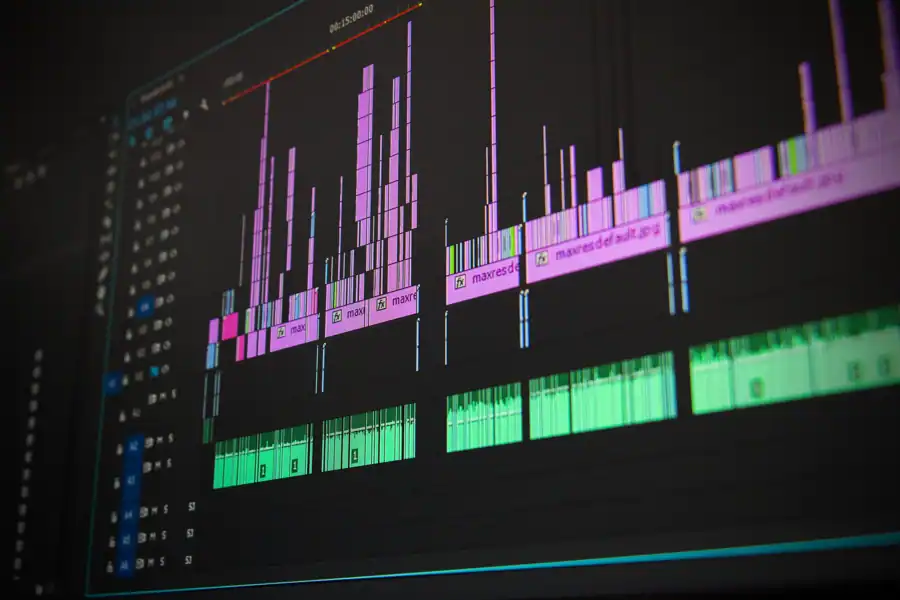
Photo: Pixabay · Pexels
03How to add soundtrack to video on iPhone
On iPhone you have two routes: the built-in Photos editor or a dedicated app. Photos works for a single quick clip but gives you almost no control over where the music starts. A third-party editor lets you trim the audio, fade it in and out, and set the exact second it begins.
- Open your editor and import the video from your camera roll.
- Tap the music or audio button, then pick a track from the library or import one from Files.
- Drag the audio track along the timeline until the beat lands on your first cut.
- Trim the tail so the music ends with the video, not after it.
- Set the music volume, start around 70-80% if there is no speech, 20-30% under dialogue.
- Export in 16:9 for YouTube or 9:16 for TikTok, Reels and Shorts.
Check the result on headphones before you post. A mix that sounds balanced on a phone speaker is often muddy on earbuds, and the reverse is just as common.
The audio track sits below the video, drag it to move where the music starts.
04Step 2: Add music on desktop for finer control
Desktop editors win on one thing: precision. You can nudge audio by single frames, split the track into segments, and duck the music automatically whenever someone speaks. If your video has narration, that ducking feature alone saves an hour of manual volume keyframing.
The workflow is the same everywhere, import video, import audio, align, mix, export. What changes is the number of decisions you can make per second of footage. On a phone you get maybe three; on a desktop timeline, dozens.
For a 60-second clip, expect five to ten minutes of work either way. The difference shows up in how natural the transitions between music and silence feel.

Photo: Diana ✨ · Pexels
05Step 3: Sync the music to the action
Perfect sync is not about hitting every beat, it is about hitting the right ones. Pick two or three moments in your clip that matter: a door opening, a jump, a punchline. Line those up with a beat or a musical accent and the rest can drift.
Three practical moves:
- Start on a downbeat. Beginning mid-phrase makes even good music feel accidental.
- Cut on the beat, not between beats. Trim your video to the music, not the reverse.
- Fade the last second. An abrupt stop reads as an error; a 0.5-1 second fade reads as intentional.
If the track has a long intro before the beat drops, either trim the intro off or move your first cut later. Nobody waits eight seconds for the music to start.
| Content in the clip | Music level | Why |
|---|---|---|
| No speech, pure visuals | 70-90% | Music carries the whole mood |
| Dialogue or voiceover | 15-30% | Speech must stay intelligible |
| Ambient game or nature audio | 40-60% | Both layers stay audible |
| Music-only intro, then speech | 80% → 25% | Duck the level when talking starts |
Test the mix at low volume on a phone. If you can still follow the speech at half volume, the balance is right.
06Step 5: Stay on the right side of copyright
This is the step that costs people their channels. Popular songs are almost never safe to use, even for a personal clip, because platforms run automatic audio fingerprinting on upload. The result ranges from muted audio to a copyright strike.
Three safe sources:
- Built-in app libraries. Tracks inside FotoPlay or EasyCut are licensed for use in your videos.
- Royalty-free libraries. Check whether attribution is required and whether commercial use is allowed.
- Your own recordings. Game capture audio, your own instrument, or licensed game music where the publisher permits it.
Game soundtracks sit in a gray zone. Publishers like Nintendo are strict about reuse; others are relaxed. If you are drawn to classic game music, it helps to know how those scores are structured and licensed, the Final Fantasy 7 soundtrack and the Zelda Ocarina of Time score are both well documented, and both are actively policed. When in doubt, use the app library.
07Common mistakes and how to fix them
- Music longer than the video. Trim the tail or add a fade-out; never let the audio run past the last frame.
- Hard cut at the end. Add a 0.5-1 second fade so the stop feels deliberate.
- Track starts before the first image. Line the first beat up with your opening frame.
- One track for a three-minute video. Switch tracks at a natural break, or the loop becomes background noise.
- Exporting at low bitrate. Audio quality drops with video quality, export at the highest setting the app offers.
- Ignoring the vertical format. A 16:9 export cropped by TikTok loses the edges of your frame.
None of these take more than a minute to fix. All of them are the reason a video feels amateur.
08Frequently asked questions
Is there a free app to add music to a video?
Yes. FotoPlay is free on iPhone and exports without a watermark, with a built-in music library and the option to import your own tracks. EasyCut is free to download with optional in-app subscriptions from $2.99 per week to $29.49 per year if you want the ad-free version.
Can I add music to a video on my phone?
Yes, and for short clips the phone is usually faster than a computer. Both iOS and Android have editors that import video, place an audio track, adjust volume and export in HD. The only real limitation is frame-level precision, which rarely matters for social content.
How do I get free background music for videos?
Use the music library inside your editing app, or a royalty-free library that states its license terms clearly. Check two things before you commit: whether attribution is required, and whether commercial use is permitted. Free does not always mean unrestricted.
How do I add a soundtrack to a video on my iPhone?
Import the clip into an editor, tap the audio or music button, choose a track from the library or from Files, then drag it along the timeline to set the start point. Trim the end, set the volume, and export in 9:16 for vertical platforms or 16:9 for YouTube.
How do I add background music to an existing video?
Open the finished file in your editor, add the audio as a second track, and mix it under the original sound rather than replacing it. Keep the music at 15-30% if the clip has speech, and higher if it does not.
How do I add music to a video on iPhone without iMovie?
Any third-party editor works. FotoPlay and EasyCut both handle the full job, import, music, trim, volume, export, without touching iMovie. The steps are the same as above, and neither requires an account.
09More on the site
Read next
Sonic 3 soundtrack: what to know
There are two Sonic 3 soundtracks, and most people arguing about the Sonic 3 soundtrack are actually talking about different games. The 1994 Genesis…

Mario the music box music: what to know
Two very different things share the name "Mario the music box music," and mixing them up wastes your time. One is the music-box-style arrangements of…

Heavy metal movie soundtrack: a practical guide
Nine big rock names, one animated film, and a tracklist that still confuses people forty years later. The heavy metal movie soundtrack everyone…